Stripe Account
Metric |
Target |
|---|---|
RPO |
n/a (no backups possible) |
RTO |
8 hours |
Losing access to Stripe does not directly impact business continuity, however it prevents us from billing customers (who are billed via Stripe) and prevents new signups (via Stripe).
Cancelled Subscriptions
Subscriptions cannot be deleted in Stripe, even if an account has been deleted. But they can be cancelled, which is irreversible and prevents us from billing that customer via this subscription.
If a Subscription is cancelled, a new one will need to be created. The old subscription information would need to be manually copied over (i.e. associated product / price).
The new Subscription would need to be manually inserted into brain,
and the cluster “moved” to it accordingly. This will require:
Inserting it into the
core.subscriptionstableSetting
core.clusters.subscription_idto the new one
Deleted Accounts (Customers)
A deleted Stripe customer is a big problem, as we immediately lose the payment method (CC) associated with this customer - the only way to restore that is to ask the customer to re-add it.
Nonetheless, re-creating a Customer would involve the following steps:
Re-creating the customer in Stripe
Updating
core.stripe_customers.idfor the organizationRe-creating any cancelled Subscriptions (same as above)
Informing the customer and asking for them to re-add their CC.
Deleted Products & Prices
This is tedious but possible.
Part 1: Restore products and prices
$ crash -U dev --hosts https://braindev.aks1.westeurope.azure.cratedb.net:4200
Password:
CONNECT OK
cr> SELECT * FROM core.product_pricing where offer = 'stripe';
+---------+--------+---------+--------+---------------------+-------------------+--------------------------------+----------------------+---------------------------+
| kind    | name   | tier    | offer  | plan                | region            | billing_dimension              | price_per_dtu_minute | min_per_billing_dimension |
+---------+--------+---------+--------+---------------------+-------------------+--------------------------------+----------------------+---------------------------+
| cluster | edge   | basic   | stripe | prod_JbO1EkQATqlHdZ | _default_         | price_1IyBFPJOpFszwfhBmXCp0aF8 |                    0 |                         1 |
| cluster | gp_v2  | premium | stripe | prod_IT3F155QzMr8dU | _default_         | price_1J8hqlJOpFszwfhBzxMupULv |               711187 |                         1 |
| cluster | gp_v2  | basic   | stripe | prod_IT3F155QzMr8dU | _default_         | price_1J7z9vJOpFszwfhBUoRaigg2 |               184932 |                         1 |
| cluster | so_v2  | basic   | stripe | prod_IT3p4dt6YIGsDO | _default_         | price_1J7zCVJOpFszwfhBNAQ3ldnr |               262557 |                         1 |
| cluster | io_v2  | basic   | stripe | prod_IT3r9dDRWciKHU | _default_         | price_1J7zBqJOpFszwfhBsmEjPLYF |               145890 |                         1 |
| cluster | mso    | pro     | stripe | prod_JlWVOLivXO4szi | _default_         | price_1J8hesJOpFszwfhBipLBX9KO |               794064 |                         1 |
| cluster | mso    | basic   | stripe | prod_JlWVOLivXO4szi | _default_         | price_1J7zSAJOpFszwfhBeADTCiYU |               411187 |                         1 |
| cluster | gp_v2  | pro     | stripe | prod_IT3F155QzMr8dU | _default_         | price_1J8hcbJOpFszwfhB2ED9mUHu |               362557 |                         1 |
| cluster | io_v2  | pro     | stripe | prod_IT3r9dDRWciKHU | _default_         | price_1J8hdYJOpFszwfhBqekdJTLU |               284932 |                         1 |
| cluster | so_v2  | pro     | stripe | prod_IT3p4dt6YIGsDO | _default_         | price_1J8heIJOpFszwfhBq0Hh6Nux |               511187 |                         1 |
| cluster | io_v2  | premium | stripe | prod_IT3r9dDRWciKHU | _default_         | price_1J8hrPJOpFszwfhBKPQOQZVd |               562557 |                         1 |
| cluster | so_v2  | premium | stripe | prod_IT3p4dt6YIGsDO | _default_         | price_1J8hryJOpFszwfhBr2zh0Qvr |               994064 |                         1 |
| cluster | mso    | premium | stripe | prod_JlWVOLivXO4szi | _default_         | price_1J8hsRJOpFszwfhBnMqs7dQS |              1531279 |                         1 |
| cluster | dev_v2 | basic   | stripe | prod_IVct7VwgPA9X75 | _default_         | price_1Idt3RJOpFszwfhBD2q0buaR |                15982 |                         1 |
| cluster | dev_v3 | basic   | stripe | prod_IVct7VwgPA9X75 | _default_         | price_1JNZkwJOpFszwfhBLNkf0d2I |                81050 |                         1 |
| cluster | dev_v3 | basic   | stripe | prod_IVct7VwgPA9X75 | aks1.eastus.azure | price_1JahtRJOpFszwfhBBtcmoz6V |                10000 |                         1 |
| cluster | io_v2  | basic   | stripe | prod_IT3r9dDRWciKHU | test.aws          | price_1JfPp9JOpFszwfhBpKudg9zC |               165890 |                         1 |
| cluster | io_v2  | basic   | stripe | prod_IT3r9dDRWciKHU | aks1.eastus.azure | price_1JfPp9JOpFszwfhBpKudg9zC |               185890 |                         1 |
+---------+--------+---------+--------+---------------------+-------------------+--------------------------------+----------------------+---------------------------+
Note
The example is for dev brain, but the prod brain is analogous.
The plan corresponds to a Product in Stripe, and the billing_dimension is
the price within the Product. Most likely you will need to create new products / prices,
and update the IDs in this table accordingly. Good luck :(
The price_per_dtu_minute to Stripe price calculation is in the CrateDB Cloud Pricing document
in Sharepoint.
Part 2: Update core.cluster_billing_info
The core.cluster_billing_info table for running clusters will have old information
about the plans and prices, and needs to be updated.
cr> SELECT b.*  FROM core.clusters c, core.cluster_billing_info b where c.is_deleted = false and c.id = b.cluster_id and b.offer = 'stripe' and b.name != 'edge';
+--------------------------------------+---------+--------+-------+--------+---------------------+-------------------+--------------------------------+----------------------+---------------------------+
| cluster_id                           | kind    | name   | tier  | offer  | plan                | region            | billing_dimension              | price_per_dtu_minute | min_per_billing_dimension |
+--------------------------------------+---------+--------+-------+--------+---------------------+-------------------+--------------------------------+----------------------+---------------------------+
| 242deafc-24e2-4875-9f70-c56a6d07f885 | cluster | dev_v3 | basic | stripe | prod_IVct7VwgPA9X75 | aks1.eastus.azure | price_1JahtRJOpFszwfhBBtcmoz6V |                10000 |                         1 |
| af9aa487-cf03-416d-9759-3f43eb34e968 | cluster | dev_v3 | basic | stripe | prod_IVct7VwgPA9X75 | aks1.eastus.azure | price_1JahtRJOpFszwfhBBtcmoz6V |                10000 |                         1 |
+--------------------------------------+---------+--------+-------+--------+---------------------+-------------------+--------------------------------+----------------------+---------------------------+
You get the picture: the plan and billing dimension have to be updated to match what’s in Stripe now.
Part 3: Add new prices to the subscriptions in Stripe
Now that the billing info table is updated, the consumption reporting will happen against the new prices. However, these prices also need to be added to the customer’s Stripe subscription for billing to work properly. First, get a list of affected subscriptions:
cr> SELECT s.id, s.reference, b.billing_dimension  FROM core.clusters c, core.cluster_billing_info b, core.subscriptions s where c.is_deleted = false and c.id = b.cluster_id and c.subscription_id = s.id and b.offer = 'stripe' and b.name !
    = 'edge';
+--------------------------------------+--------------------+--------------------------------+
| id                                   | reference          | billing_dimension              |
+--------------------------------------+--------------------+--------------------------------+
| e4721073-1080-47eb-99d5-9bd8d7d06995 | sub_JqU3tdWhMHMRFe | price_1JahtRJOpFszwfhBBtcmoz6V |
| 43a63c87-cd02-4173-91ad-1a1a2dd76612 | sub_JAS5dc2n5AJuxx | price_1JahtRJOpFszwfhBBtcmoz6V |
+--------------------------------------+--------------------+--------------------------------+
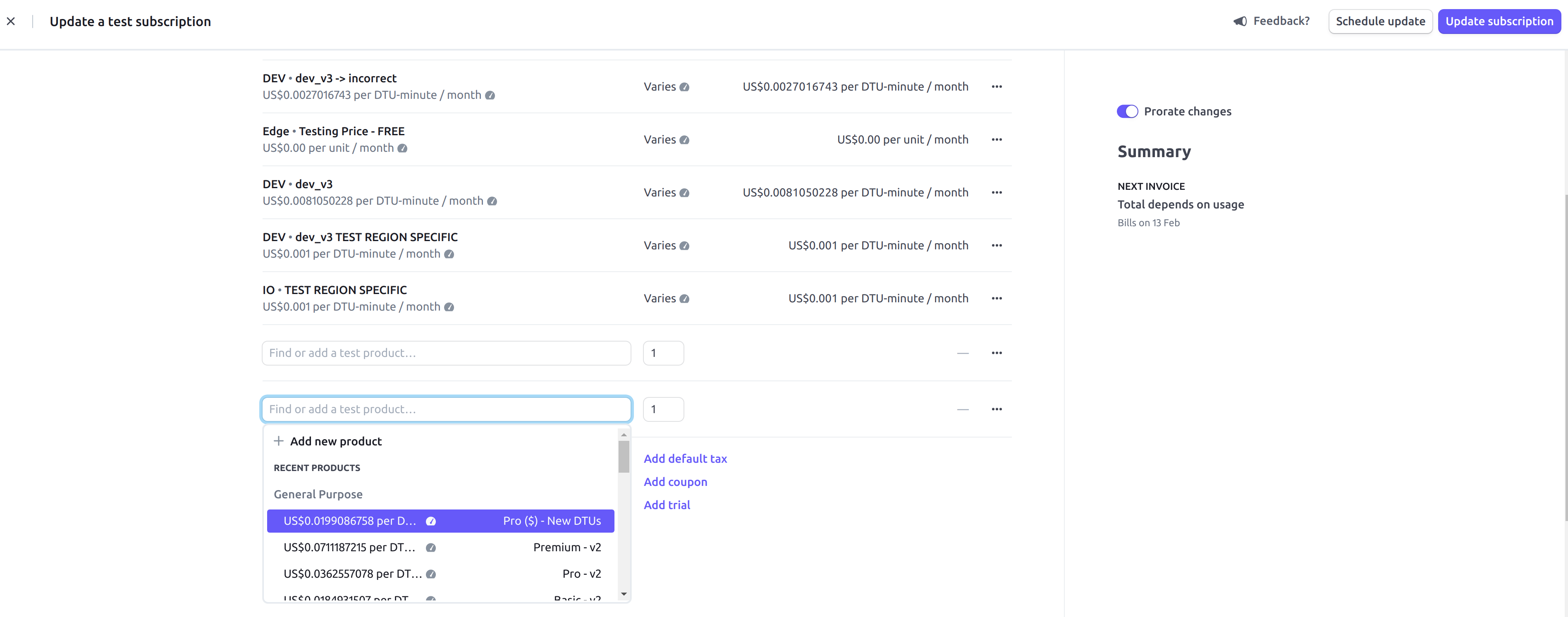
The reference is the Stripe subscription id. You can enter that into the Stripe
dashboard’s Search field to go to the right subscription. Now go to Actions ->
Update subscription and click on Add Product.
Now add the relevant price (billing_dimension) to the subscription:
After this, billing should work. Double check the core.consumption_report table for
the given subscription:
cr> SELECT * FROM core.consumption_report where subscription_id = 'sub_JqU3tdWhMHMRFe' order by from_ts desc limit 5;
+---------------+---------------+--------------------------------------+--------------------+-------------------+-------------------------------+
|       from_ts |         to_ts | cluster_id                           | subscription_id    | consumption_total | reporting_id                  |
+---------------+---------------+--------------------------------------+--------------------+-------------------+-------------------------------+
| 1641463745114 | 1641466802169 | 242deafc-24e2-4875-9f70-c56a6d07f885 | sub_JqU3tdWhMHMRFe |              51.0 | mbur_1KEtnAJOpFszwfhBrkLgR9ug |
| 1641304802448 | 1641307169735 | 8d71bd37-4b70-4bee-8592-a1069bac9ad4 | sub_JqU3tdWhMHMRFe |              39.0 | mbur_1KEEaMJOpFszwfhBrbP9ES0G |
| 1641301202205 | 1641304802448 | 8d71bd37-4b70-4bee-8592-a1069bac9ad4 | sub_JqU3tdWhMHMRFe |              60.0 | mbur_1KEDeaJOpFszwfhB6gu7r7xF |
| 1641297601637 | 1641301202205 | 8d71bd37-4b70-4bee-8592-a1069bac9ad4 | sub_JqU3tdWhMHMRFe |              60.0 | mbur_1KECiCJOpFszwfhBrHe66kyj |
| 1641294339920 | 1641297601637 | 8d71bd37-4b70-4bee-8592-a1069bac9ad4 | sub_JqU3tdWhMHMRFe |              54.0 | mbur_1KEBmFJOpFszwfhBKFNFjivH |
+---------------+---------------+--------------------------------------+--------------------+-------------------+-------------------------------+
There should be no entries with a NULL reporting_id after a consumption reporting job has run
(they run every hour).